An editable image represents a fundamental shift in how photographers and retouchers approach their craft. Unlike static, flattened files that offer limited adjustment capability, an editable image preserves layers, adjustment settings, and source data that enable comprehensive modifications without degrading quality. Professional photo retouching workflows in 2026 increasingly rely on this flexibility to meet client demands for quick revisions, brand consistency, and pixel-perfect results. Understanding what makes an image truly editable and how to leverage these capabilities has become essential for anyone working in professional photo editing.
Understanding Editable Image Formats and Their Applications
The foundation of an editable image begins with choosing the right file format. Not all image files offer the same level of editing flexibility, and understanding these differences impacts workflow efficiency and final output quality.
Native Format Advantages
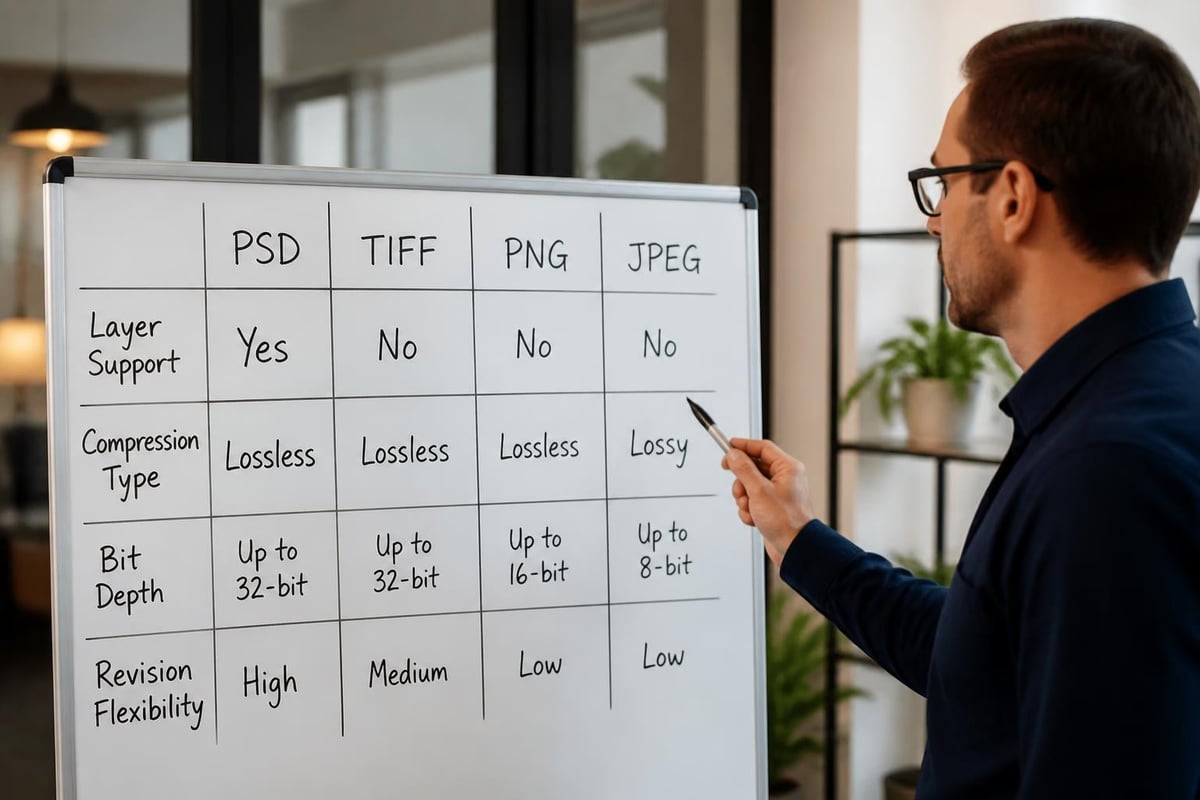
Professional editing software creates proprietary formats that preserve maximum editability. Adobe Photoshop's PSD format stores layers, masks, adjustment layers, smart objects, and vector elements in a single file. GIMP uses XCF, while Affinity Photo employs AFPHOTO. These formats maintain complete editing history and non-destructive workflows.
Key benefits of native editable formats include:
- Preservation of all layer information and blending modes
- Non-destructive adjustment capabilities through smart filters
- Vector element retention for scalable graphics
- Text layer editability without rasterization
- Complete color profile and bit-depth support
When working with various image formats, professionals must balance file size against editing flexibility. A 16-bit PSD file with dozens of layers might exceed several gigabytes, but this size enables unlimited revision potential without quality loss.
Vector Versus Raster Editability
The distinction between vector and raster formats fundamentally affects how images remain editable. Vector formats like SVG, AI, and EPS store mathematical paths rather than pixels, enabling infinite scaling without quality degradation. Raster formats record pixel data, making them resolution-dependent.
Understanding differences between vector and raster image formats helps determine the best approach for specific projects. Logo designs benefit from vector editability, while photographic retouching requires raster formats with layer support.
| Format Type | Best Use Cases | Scaling Behavior | File Size |
|---|---|---|---|
| Vector (AI, SVG) | Logos, illustrations, icons | Infinite without quality loss | Generally smaller |
| Layered Raster (PSD, TIFF) | Photo retouching, composites | Resolution-dependent | Larger with layers |
| Flat Raster (JPEG, PNG) | Final delivery, web use | Quality loss when enlarged | Smallest compressed |
Creating and Maintaining Editable Image Workflows
Establishing systematic approaches to maintaining editability throughout the photo editing process ensures maximum flexibility for client revisions and future adjustments.
Non-Destructive Editing Techniques
Smart objects represent one of the most powerful features for preserving editability. Converting layers to smart objects allows filters and transformations to remain adjustable indefinitely. This technique proves invaluable when clients request variations weeks or months after initial delivery.
Adjustment layers separate color and tonal modifications from original pixel data. Instead of directly altering image pixels, adjustment layers apply changes through mathematical operations that can be modified, disabled, or deleted without affecting the source image. This approach maintains a fully editable image at every workflow stage.
Essential non-destructive techniques include:
- Converting source images to smart objects before applying filters
- Using adjustment layers for all color correction and tonal modifications
- Implementing layer masks instead of erasing pixels
- Applying transformations through smart object containers
- Saving selection channels for repeatable masking workflows
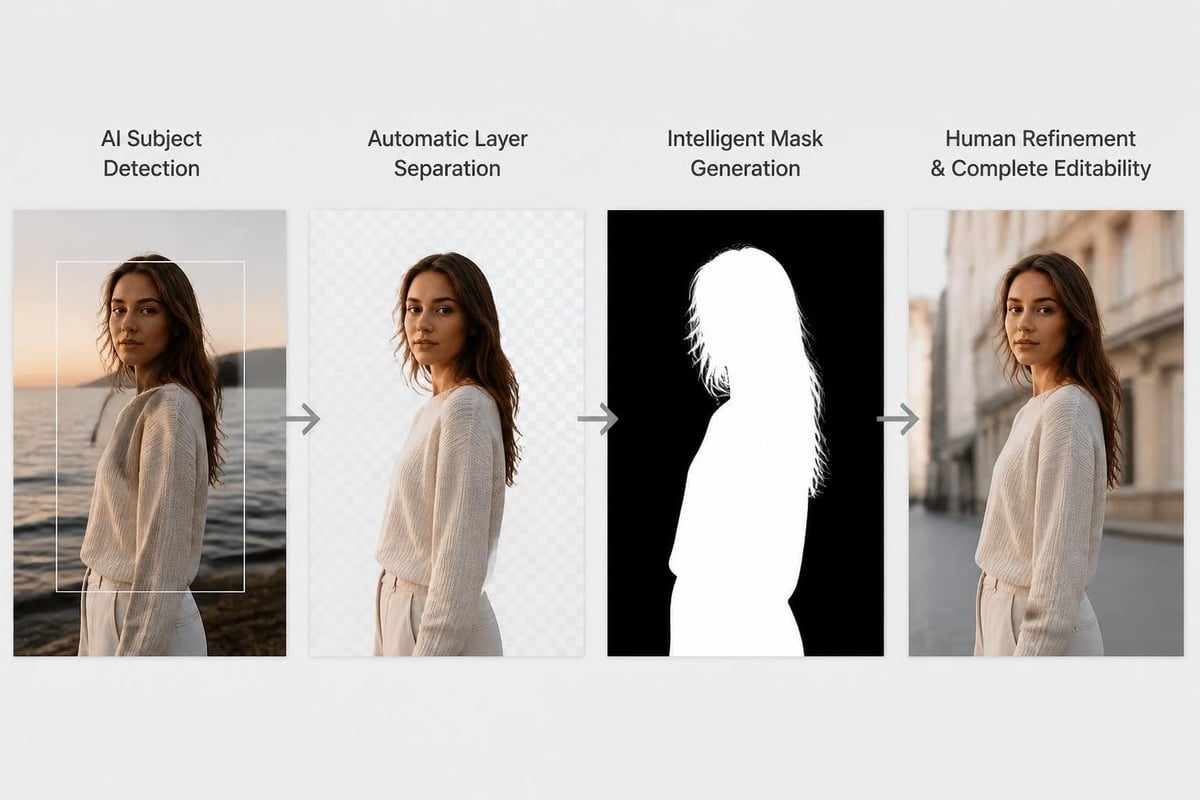
The recent introduction of features like Canva's Magic Layers demonstrates how artificial intelligence is making previously flat images editable by automatically separating elements into layers. This technology bridges the gap between static deliverables and fully editable source files.
Organizing Editable Files for Team Collaboration
Professional retouching operations handling multiple projects simultaneously require robust organization systems. An editable image without proper naming conventions and folder structures becomes difficult to locate and modify when clients request changes.
Layer naming conventions directly impact how efficiently team members can navigate complex editable image files. Descriptive names like "Subject_Skin_Retouching" or "Background_Color_Adjustment" enable any retoucher to understand file structure immediately. Group related layers into folders organized by function-retouching, color correction, compositing elements, and final adjustments.
Cloud-based version control systems track changes across editable image iterations. Services specifically designed for creative workflows maintain thumbnail previews and allow rollback to previous versions, ensuring no work is permanently lost during collaborative editing sessions.
Advanced Editing Capabilities in Modern Workflows
The evolution of editing software has expanded what constitutes an editable image, introducing capabilities that were impossible just a few years ago.
AI-Powered Editing and Editability
Artificial intelligence has transformed how professionals approach photo retouching and editing. Machine learning algorithms can now isolate subjects, remove backgrounds, and apply style transfers while maintaining full editability of the results.
Research into editable image elements demonstrates how controllable synthesis enables unprecedented manipulation capabilities. These techniques allow editors to modify specific attributes-lighting direction, facial expressions, object positions-without manually painting or compositing elements.
Text-to-image generation platforms now support editable customization approaches that maintain consistent subject identity across variations. This technology proves particularly valuable for ecommerce photography where products must appear consistent across multiple contexts while remaining fully editable for color variations and seasonal updates.
Specialized Applications Requiring Maximum Editability
Different photography niches demand specific approaches to maintaining editable files. Product photography for online retailers requires meticulous attention to symmetry, color accuracy, and background consistency.
Professional ecommerce operations benefit from specialized workflows that maintain editability across hundreds or thousands of product images. Ecommerce Photo Editing services employ template-based approaches where adjustment layers, cropping guides, and background settings remain editable across entire product catalogs. This systematic approach enables rapid color corrections when product variations arrive or brand guidelines change.
Studio photographers working with newborn and family portraits, such as those at One Big Happy Photo, LLC, maintain editable master files that preserve skin retouching, background enhancements, and color grading as separate adjustable elements. This flexibility allows photographers to offer different print finishes and digital products from a single editable source.
Text-Based Image Editing Systems
Emerging technologies introduce text-based editable image restoration frameworks where natural language instructions drive editing operations. Instead of manually adjusting sliders and painting masks, editors describe desired changes in plain language, and algorithms interpret these instructions while maintaining full editability of results.
This approach democratizes advanced retouching by lowering the technical barrier to achieving professional results. An editable image can now incorporate semantic understanding, where modifications to "brighten the subject's face" automatically create appropriate adjustment layers targeting only facial regions.
Industry-Specific Editable Image Requirements
Different sectors impose unique demands on how images must remain editable to serve business objectives effectively.
Scientific and Technical Documentation
Research and medical imaging require absolute precision in editable formats. Platforms like BioRender provide specialized tools for creating scientific illustrations where every element remains individually editable. This capability allows researchers to update diagrams as new data emerges without recreating entire graphics.
Scientific publishers increasingly mandate submission of editable source files alongside final figures, enabling independent verification of image processing steps and ensuring no data manipulation occurred during presentation preparation.
Commercial Photography and Marketing
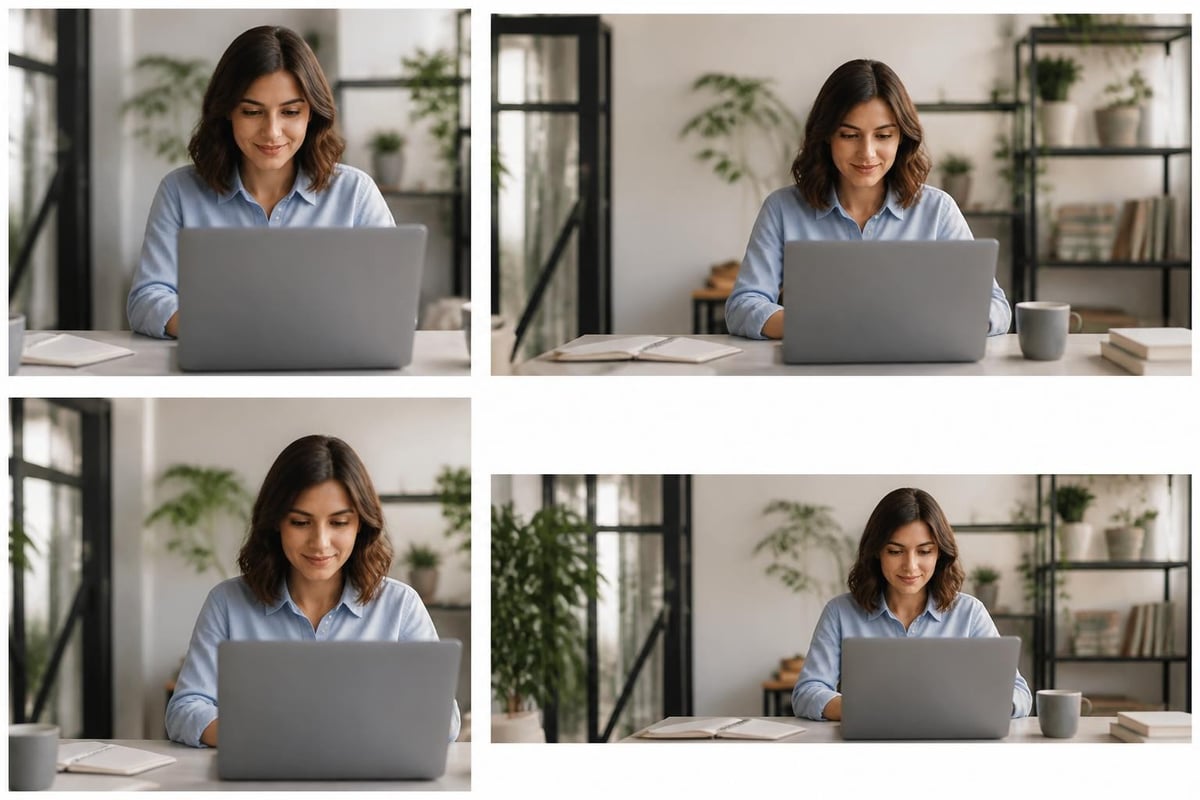
Marketing campaigns frequently require variations of hero images across multiple platforms and aspect ratios. Maintaining a master editable image with all elements on separate layers enables rapid adaptation without returning to the original photography session.
Social media content creation particularly benefits from editable templates where brand colors, product placements, and messaging can be swapped while maintaining consistent visual style. Photography studios offering these services maintain libraries of editable compositions that clients can customize for ongoing campaigns.
Marketing-focused editability considerations include:
- Maintaining vector logos and text as editable elements
- Separating subject, background, and graphic overlays
- Preserving multiple color scheme variations
- Organizing size-specific crops as artboards or slices
- Documenting font choices and brand color codes
Free tools like Pixlr demonstrate how even budget-conscious creators can access editable image capabilities, though professional operations typically require more sophisticated platforms for client work.
Protecting Editability and Client Deliverables
Balancing client access to editing capabilities with intellectual property protection presents unique challenges for professional retouchers.
Watermarking and Edit Protection
Research into watermark-preserving editing explores how protective marks can survive substantial image modifications. This technology enables photographers to provide clients with editable files that maintain attribution and usage tracking even after adjustments.
Some retouching services provide tiered deliverables-flattened JPEGs for immediate use, and fully editable layered files as premium offerings or after final payment. This approach protects work-in-progress while ensuring clients receive flexibility they've purchased.
File Delivery Best Practices
When delivering editable images to clients, clear documentation prevents confusion and support requests. Include a README file explaining layer organization, required fonts, and linked asset locations. For complex composites, provide a flattened reference JPEG showing intended appearance alongside the editable source file.
Consider client technical capabilities when determining appropriate editable formats. A small business owner might struggle with multi-gigabyte PSD files but can successfully work with simplified layer structures or TIFF files with embedded adjustments.
| Client Type | Recommended Format | Layer Complexity | Support Level |
|---|---|---|---|
| Professional designers | Full PSD with all layers | Maximum | Minimal guidance needed |
| Marketing departments | Organized PSD with grouped layers | Moderate | Layer guide document |
| Small business owners | Flattened TIFF with basic adjustments | Simplified | Step-by-step instructions |
| Print-only needs | High-res TIFF or PDF | Flattened | None required |
Optimizing Storage and Performance
Large editable image files challenge storage infrastructure and editing performance, requiring strategic approaches to maintain workflow efficiency.
Smart File Management Strategies
Enable automatic compression for PSD files in application preferences, which can reduce file sizes by 30-50% without affecting editability. Remove unused layers and alpha channels before archiving completed projects. Flatten any layers where future editability provides no practical value.
For projects requiring multiple high-resolution editable images, consider linked smart objects that reference external files rather than embedding full-resolution data. This approach keeps master documents manageable while preserving editing flexibility across all components.
Cloud storage solutions designed for creative professionals offer automatic versioning and preview generation for editable formats. These systems enable team access without transferring massive files, as editors can check out specific images for modification and check them back in with change tracking.
Performance Optimization Techniques
Working with large editable images demands hardware optimization. Allocate sufficient RAM to editing applications-Adobe recommends minimum 16GB but 32GB or more proves optimal for complex retouching projects. Enable scratch disk allocation across multiple fast drives, preferably SSDs, to improve performance when RAM fills.
Reduce visible layer count by temporarily hiding non-essential elements during intensive operations. Use adjustment layer groups that can be toggled on or off to evaluate changes without permanently applying them. Convert completed retouching work to smart objects to consolidate dozens of layers into single manageable units.
Professional photography editing software continues evolving to handle increasingly complex editable files more efficiently. GPU acceleration, improved caching algorithms, and smarter preview rendering enable real-time editing of files that would have been impractical just a few years ago.
Future Developments in Editable Image Technology
The trajectory of editable image technology points toward even greater flexibility and intelligence in coming years.
Emerging Standards and Formats
Industry efforts to standardize editable image interchange focus on creating universal formats that preserve editing capabilities across different software platforms. OpenEXR has gained traction for HDR imaging with multiple channels and deep data support. Efforts to extend formats like TIFF and PNG with standardized layer metadata aim to reduce reliance on proprietary formats.
Web-based editing platforms increasingly support saving fully editable projects to cloud storage, enabling cross-device workflows where projects begun on desktop continue seamlessly on tablets or smartphones. These approaches require new file formats optimized for network transfer while maintaining complete editability.
Integration with Three-Dimensional Workflows
The boundary between two-dimensional editable images and three-dimensional scenes continues blurring. Modern compositing allows flat photos to be mapped onto 3D geometry, enabling perspective changes and lighting adjustments impossible with traditional photo editing. These hybrid workflows maintain editability of both photographic elements and spatial arrangements.
Product visualization increasingly relies on editable 3D renders that can be modified for different angles, lighting conditions, and material finishes without new photography sessions. This technology proves particularly valuable for ecommerce applications where demonstrating product variations efficiently drives sales.
Emerging capabilities in editable imaging include:
- Neural rendering that generates editable output from simple sketches
- Photogrammetry integration enabling 3D object extraction from photos
- Real-time collaboration on shared editable canvases
- Blockchain-verified editing history for authentication
- Semantic understanding enabling natural language editing commands
Mastering editable image workflows separates efficient professional operations from those struggling with revision bottlenecks and quality degradation. The techniques and technologies discussed here enable photographers, retouchers, and creative teams to deliver exceptional results while maintaining flexibility for inevitable client changes. When you need expert handling of complex photo editing projects that demand both technical precision and artistic vision, Photo Editing Company provides professional retouching services with the efficiency and quality standards that modern businesses require.