Instagram has evolved far beyond a simple photo-sharing platform, becoming a comprehensive visual editing ecosystem that millions rely on daily. Whether you're a business showcasing products, an influencer building a brand, or a photographer sharing your portfolio, using Instagram for editing photos has become an essential skill in 2026. The platform's native editing capabilities, combined with third-party applications and professional workflows, offer unprecedented opportunities to create visually stunning content that captures attention and drives engagement.
Understanding Instagram's Built-In Editing Capabilities
Instagram's native editing tools have matured significantly over the years, providing users with robust options for enhancing photos without leaving the app. The platform includes adjustment controls for brightness, contrast, saturation, warmth, and structure, allowing for precise modifications to your images.
When you upload a photo to Instagram, you gain immediate access to these fundamental editing tools. Instagram's editing tools provide a straightforward interface that balances simplicity with functionality. The adjustment sliders let you fine-tune each parameter independently, ensuring your image achieves the desired aesthetic before posting.
Filter Applications and Customization
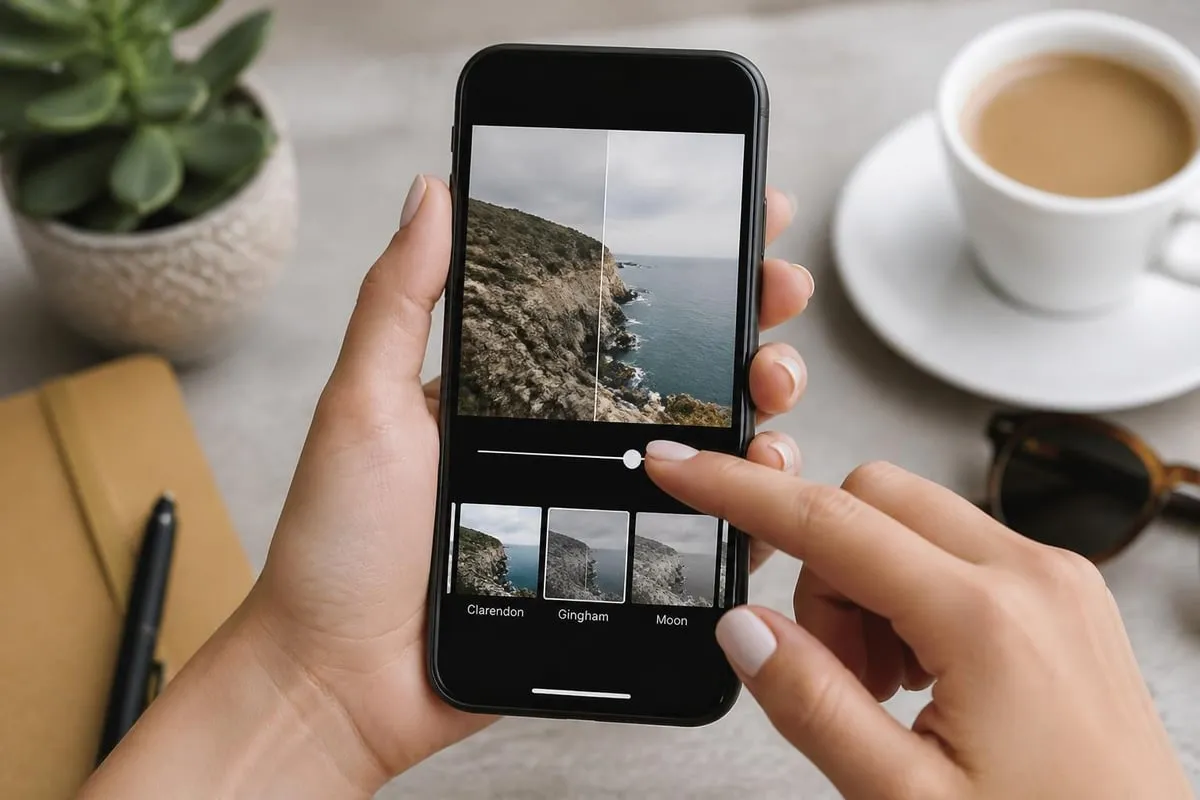
Instagram's signature filters remain one of the most recognizable features for quick photo enhancement. The platform offers over 40 filters, each designed to create specific moods and visual styles. However, professional users understand that filters should serve as starting points rather than final solutions.
- Apply filters at reduced intensity for subtle enhancements
- Combine filter effects with manual adjustments for custom looks
- Test multiple filters to identify the best match for your content theme
- Consider your overall feed aesthetic when selecting filters
The key to professional results lies in customization. After applying a filter, you can adjust its intensity using the slider control, blending the effect seamlessly with your original image. This approach creates consistency across your Instagram feed while maintaining visual interest.
Advanced Editing Tools Within Instagram
Beyond basic adjustments, Instagram for editing photos includes sophisticated tools that rival standalone editing applications. The Lux tool automatically enhances photos by analyzing the image and applying intelligent adjustments to exposure and contrast. While convenient, manual control typically yields superior results for professional content.
Instagram's selective adjustment tools allow targeted editing of specific image areas. The vignette tool darkens or lightens image edges, drawing focus to the center of your composition. The tilt-shift feature creates miniature effects or selective focus, adding creative depth to your photos.
AI-Powered Editing Features
Instagram has integrated artificial intelligence into its editing workflow, introducing features like the Restyle AI tool that transforms images using preset styles or custom text prompts. This technology represents a significant shift in how users approach photo editing on the platform.
| AI Feature | Capability | Best Use Case |
|---|---|---|
| Restyle AI | Style transformation via text prompts | Creative content experimentation |
| Background Blur | Automatic subject isolation | Portrait enhancement |
| Auto-Enhance | Intelligent multi-parameter adjustment | Quick corrections |
| Face Detection | Automatic skin smoothing and lighting | Portrait photography |
These AI capabilities streamline the editing process, particularly for users managing high-volume content creation. However, understanding when to use AI versus manual editing remains crucial for maintaining authentic, high-quality results. For those seeking professional standards, comparing AI and manual photo editing reveals important considerations about quality and control.
Third-Party Apps for Instagram Photo Editing
While Instagram's native tools handle many editing tasks, dedicated third-party applications offer expanded capabilities for users seeking professional-grade results. These apps integrate seamlessly with Instagram, allowing you to edit photos externally before uploading.
Popular options include VSCO, Lightroom Mobile, Snapseed, and Adobe Express. Each application brings unique strengths to the Instagram editing workflow. VSCO excels in film-inspired aesthetics, Lightroom Mobile provides professional-grade color grading, Snapseed offers advanced selective editing, and Adobe Express combines simplicity with power.
Selecting the Right Editing App
Instagram photo editing apps vary widely in features, interface design, and pricing models. When choosing an application, consider your specific editing needs, technical expertise, and budget constraints.
- Beginners: Apps with preset filters and one-tap enhancements
- Intermediate users: Applications offering layer-based editing and selective adjustments
- Advanced editors: Professional tools with RAW processing and advanced color grading
- Business users: Solutions with batch editing and brand consistency features
For businesses managing product photography, the editing workflow extends beyond basic Instagram tools. Professional services that specialize in ecommerce photo editing can transform product images with precise retouching, color correction, and background removal that meets commercial standards.
Professional Editing Workflows for Instagram
Developing a consistent editing workflow maximizes efficiency while maintaining quality standards across your Instagram content. Professional photographers and brands typically establish systematic approaches that ensure every image meets their visual standards.
The professional workflow begins with image selection and culling. Before editing, review all captured photos and identify the strongest candidates for your Instagram feed. This selective process saves time and focuses your editing efforts on images with the highest potential.
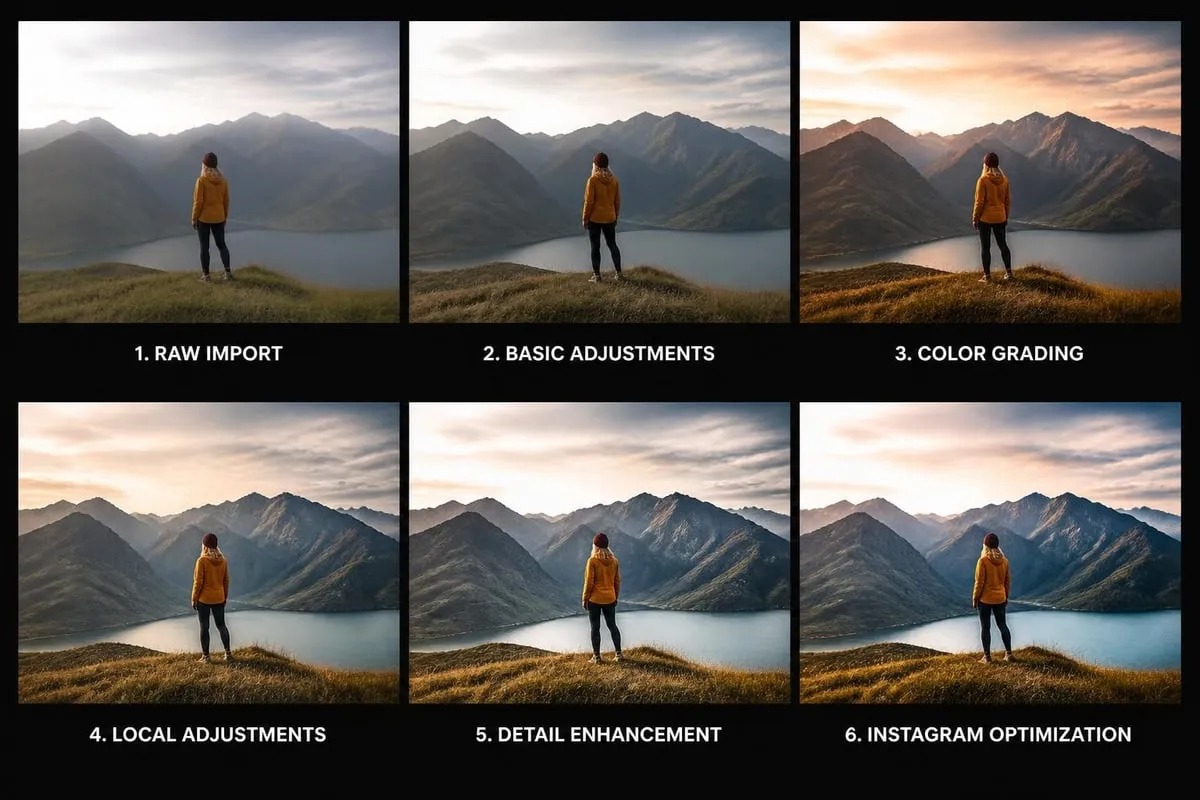
Step-by-Step Instagram Editing Process
- Import and organize: Transfer photos to your editing application and organize by shoot or theme
- Initial corrections: Adjust exposure, white balance, and straighten composition
- Color grading: Apply color corrections and establish your signature color palette
- Detail refinement: Enhance sharpness, reduce noise, and perform selective adjustments
- Final polish: Apply subtle vignettes, adjust highlights and shadows, and verify consistency
- Export optimization: Size images appropriately for Instagram's display requirements
This systematic approach ensures no editing step gets overlooked. Consistency in your workflow translates directly to consistency in your Instagram feed's visual presentation. For beginners establishing their first workflow, exploring photo editing programs for beginners provides foundational knowledge.
Color Correction and Grading Techniques
Color represents one of the most powerful tools when using Instagram for editing photos. Proper color correction ensures accurate skin tones, true-to-life product representation, and visually appealing compositions that stop scrollers mid-feed.
Color correction addresses technical issues like white balance inconsistencies and color casts. Color grading, by contrast, applies creative color treatments that establish mood and style. Understanding this distinction elevates your Instagram editing from corrective to creative.
Essential Color Adjustments
Professional Instagram editors focus on specific color parameters to achieve consistent, high-quality results. The RGB curves provide precise control over individual color channels, allowing sophisticated color manipulations impossible with basic sliders.
| Color Tool | Purpose | Instagram Impact |
|---|---|---|
| White Balance | Correct color temperature | Natural, believable images |
| Vibrance | Enhance muted colors without oversaturation | Eye-catching without appearing artificial |
| Saturation | Overall color intensity | Bold, dramatic effects |
| Hue Shifts | Change specific color ranges | Brand color consistency |
| Split Toning | Add colors to highlights and shadows | Cinematic, stylized aesthetics |
Temperature and tint adjustments correct lighting conditions from your original capture. Warmer tones (higher temperature) create inviting, cozy feelings, while cooler tones (lower temperature) convey professionalism and precision. Instagram feeds that maintain consistent color temperature develop stronger visual identities.
Retouching and Enhancement for Instagram
Professional-quality Instagram content often requires retouching beyond basic adjustments. Portrait photography particularly benefits from careful skin retouching, blemish removal, and facial feature enhancement.
When retouching for Instagram, subtlety remains paramount. Over-edited images appear artificial and undermine credibility, particularly for businesses building trust with potential customers. The goal is enhancement that appears natural and maintains the subject's authentic appearance.
Skin Retouching Best Practices
- Remove temporary blemishes while preserving skin texture
- Apply frequency separation for professional skin smoothing
- Enhance eyes and teeth without creating unnatural appearances
- Maintain consistent retouching standards across all portrait content
Professional retouching skin techniques require specialized knowledge and tools. While Instagram provides basic smoothing filters, achieving magazine-quality results typically requires dedicated retouching applications or professional services. The photo smoothing process balances blemish removal with texture preservation for natural-looking results.
Product Photography Editing for Instagram
Business accounts using Instagram for editing photos face unique challenges when presenting products. Product images must accurately represent items while creating visual appeal that drives engagement and conversions.
Product photography editing focuses on background removal, color accuracy, symmetrical alignment, and detail enhancement. Clean, professional product photos communicate brand quality and increase purchase confidence among Instagram users.
Product Image Requirements
Instagram's visual-first platform demands exceptional product photography. Poor product images directly impact sales, particularly for ecommerce businesses relying on Instagram shopping features.
- Background consistency: White or branded backgrounds create professional appearance
- Color accuracy: Products must match actual items to prevent returns
- Detail clarity: Sharp, well-lit images showcase product quality
- Composition uniformity: Consistent product positioning across catalog
Many successful businesses utilize professional product photo editing services to ensure their Instagram content meets commercial standards. Professional editors handle background removal, clipping paths, color correction, and shadow creation that transform basic product shots into sales-driving Instagram content.
Maintaining Feed Consistency Through Editing
Instagram success increasingly depends on cohesive feed aesthetics. Users make split-second decisions about whether to follow accounts based on visual impression, making consistent editing styles essential for growth.
Feed consistency extends beyond individual photo quality to encompass color palettes, editing styles, composition approaches, and content themes. Your editing choices should reinforce your brand identity and create recognizable visual signatures.
Creating a Signature Editing Style
Developing a signature style for Instagram for editing photos requires intentionality and discipline. Begin by identifying 3-5 color values that represent your brand. Apply these colors consistently through color grading, ensuring every image incorporates elements of your palette.
Signature style components:
- Consistent brightness and contrast levels across all images
- Recurring color temperature that defines your feed's overall warmth
- Standardized saturation levels that prevent jarring transitions
- Regular use of specific filters or editing presets
- Predictable composition and subject placement patterns
Creating and saving custom presets accelerates your workflow while ensuring consistency. Most professional editing applications allow preset creation, enabling one-click application of your signature style to new images. This efficiency proves invaluable for businesses managing daily Instagram content.
Optimizing Photos for Instagram's Technical Requirements
Technical optimization ensures your carefully edited photos display correctly across Instagram's various formats and devices. Understanding Instagram's image specifications prevents quality loss and maintains your editing work's integrity.
Instagram supports square (1:1), portrait (4:5), and landscape (1.91:1) aspect ratios for feed posts. Stories and Reels use vertical 9:16 formats. Each format requires specific consideration during editing to ensure important visual elements aren't cropped.
Image Size and Quality Specifications
| Instagram Format | Recommended Size | Aspect Ratio | Best Use |
|---|---|---|---|
| Feed Square | 1080 x 1080 px | 1:1 | Traditional posts |
| Feed Portrait | 1080 x 1350 px | 4:5 | Maximum screen space |
| Feed Landscape | 1080 x 566 px | 1.91:1 | Panoramic content |
| Stories/Reels | 1080 x 1920 px | 9:16 | Full-screen vertical |
| IGTV Cover | 420 x 654 px | 1:1.55 | Video thumbnails |
Instagram compresses uploaded images, potentially degrading quality. Export photos at maximum quality settings from your editing application. Use JPEG format at 100% quality for best results, ensuring file sizes remain under Instagram's 30MB limit.
Leveraging Instagram Stories for Quick Edits
Instagram Stories introduce different editing dynamics compared to feed posts. The ephemeral nature of Stories encourages experimentation and less polished aesthetics, though professional quality still matters for business accounts.
Stories include unique editing tools like stickers, GIFs, polls, questions, and drawing tools. These interactive elements transform static photos into engaging content that drives follower interaction. The text tool offers various fonts and styles for overlaying information directly onto images.
Recent updates to Stories include Instagram's Instants feature, enabling spontaneous, unedited photo sharing that disappears after viewing. This feature represents Instagram's acknowledgment that not all content requires extensive editing, though understanding when to use polished versus raw content remains important.
Advanced Techniques and Professional Considerations
Professional Instagram users employ advanced editing techniques that separate exceptional content from average posts. These methods require deeper technical knowledge but deliver significantly superior results.
Layer-based editing in applications like Photoshop or Affinity Photo enables non-destructive editing workflows. Each adjustment exists on separate layers, allowing unlimited revision without degrading image quality. This approach proves essential for complex retouching projects and composite images.
Professional-Grade Editing Methods
- Frequency separation: Separates texture from color for independent editing
- Dodge and burn: Selectively lightens and darkens areas for dimensional depth
- Color lookup tables (LUTs): Applies complex color grades instantly
- Luminosity masks: Creates selections based on brightness values for targeted adjustments
- Focus stacking: Combines multiple images for extended depth of field
These techniques typically exceed Instagram's native capabilities, requiring desktop editing software or professional-grade mobile applications. However, the results justify the additional effort for businesses and creators prioritizing visual excellence.
For those seeking to understand how visual content performs on Instagram, research on optimizing engagement reveals how AI can help maximize reach while maintaining artistic integrity. Additionally, studies on Instagram filter removal demonstrate advanced techniques for restoring original image quality from filtered photos.
Working with Professional Editing Services
Many businesses and influencers recognize that consistently producing high-quality edited photos for Instagram requires significant time investment. Professional editing services offer solutions that scale content production while maintaining quality standards.
Outsourcing Instagram photo editing allows photographers and businesses to focus on content creation and strategy rather than time-consuming post-processing. Professional editors bring specialized expertise in retouching, color grading, and image optimization that elevates content quality.
When selecting a professional service, evaluate their portfolio for style compatibility with your brand. Communication clarity regarding your editing preferences ensures consistent results that match your vision. Turnaround times, pricing structures, and revision policies represent important considerations for sustainable partnerships.
Working with an online retoucher provides flexibility and scalability for growing Instagram accounts. Professional services handle batch editing efficiently, maintaining consistency across large image volumes that would prove challenging for individual editors.
Strategic Editing for Different Instagram Content Types
Different content categories on Instagram benefit from tailored editing approaches. Product photos, lifestyle images, portraits, and behind-the-scenes content each serve distinct purposes requiring specific editing considerations.
Product photography demands accuracy and clarity above all else. Colors must represent actual products precisely, preventing customer disappointment and returns. Clean backgrounds eliminate distractions, focusing viewer attention exclusively on the product. Proper lighting and shadow creation add dimension that translates into perceived value.
Content-Specific Editing Strategies
Portrait photography emphasizes flattering skin tones, natural retouching, and engaging eye contact. Edit to enhance subject presence while maintaining authentic appearance. Subtle skin smoothing, teeth whitening, and eye enhancement create polished results without crossing into unrealistic territory.
Lifestyle images benefit from warm, inviting color grades that create emotional connections. Environmental context matters in lifestyle photography, so edit backgrounds thoughtfully to support rather than distract from the main subject.
Behind-the-scenes content typically requires minimal editing, maintaining authenticity that builds trust with followers. Light exposure correction and basic color balance suffice, preserving the candid nature that makes this content valuable.
Food photography relies heavily on color vibrancy and appealing warmth. Enhance yellows, reds, and greens to make dishes appear fresh and appetizing. Proper white balance ensures accurate food color representation that triggers appetite response.
Strategic partnerships with agencies specializing in visual marketing can amplify your Instagram presence. MDO Digital helps service-based businesses build cohesive brand identities through strategic marketing systems, ensuring your edited photos align with broader business objectives. Similarly, for businesses targeting Nordic markets, Fremadd provides comprehensive digital marketing services that integrate Instagram strategies with overall business growth.
Mastering Instagram for editing photos requires combining technical knowledge with creative vision and strategic thinking. The platform's native tools provide solid foundations, while third-party applications and professional services unlock advanced capabilities for those seeking exceptional results. Whether you're editing independently or partnering with specialists, consistent quality and strategic visual presentation drive Instagram success. Photo Editing Company offers professional retouching and editing services that transform your Instagram content, delivering the polish and consistency that builds followers and drives engagement across all your social media platforms.
Related reading: