Instagram remains the dominant visual platform in 2026, with over 2.5 billion active users demanding increasingly sophisticated content. Finding the right photo editor for Insta has become essential for businesses, influencers, and content creators who want to stand out in crowded feeds. The difference between a casual snapshot and a professional-looking post often determines engagement rates, follower growth, and ultimately, success on the platform. This comprehensive guide explores the tools, techniques, and strategies that professional photo retouching services use to create compelling Instagram content.
Understanding Instagram's Image Requirements in 2026
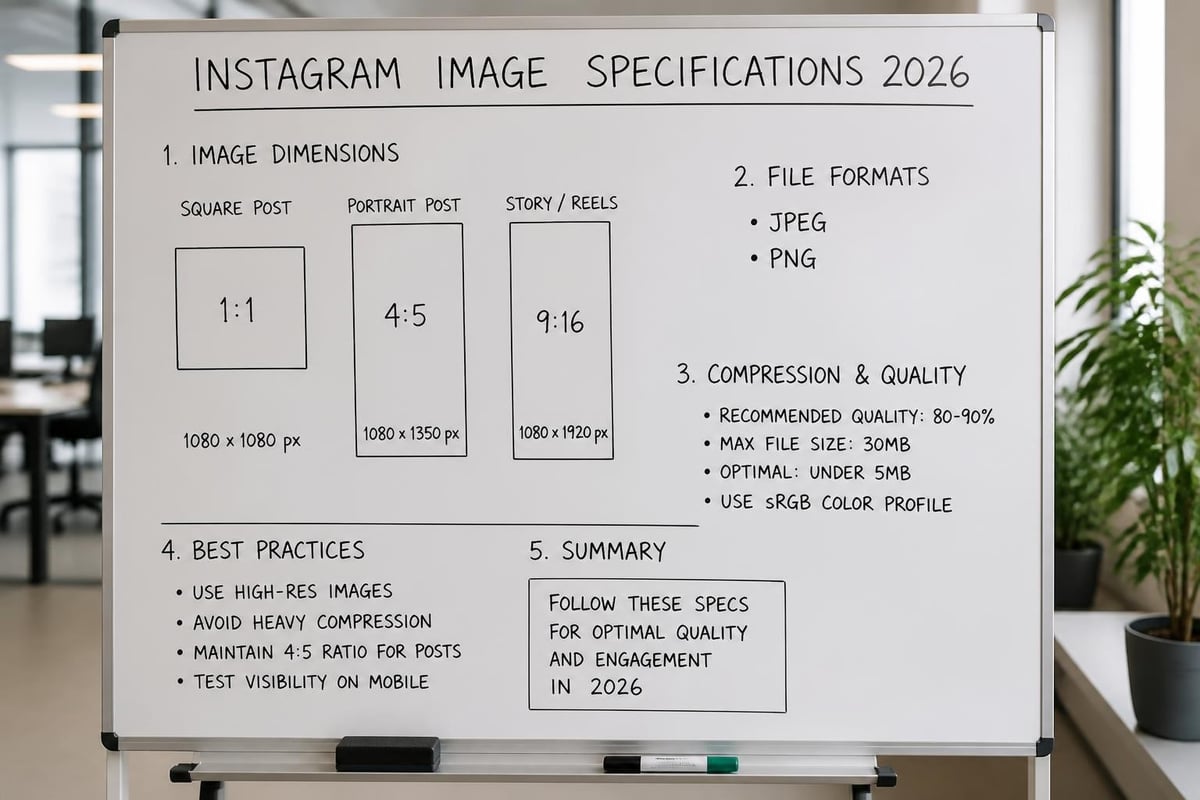
Instagram's technical specifications continue to evolve, making it crucial to understand current requirements before selecting a photo editor for Insta. The platform now supports images up to 8K resolution for certain account tiers, though standard posts still perform optimally at 1080 x 1080 pixels for square formats, 1080 x 1350 pixels for portrait, and 1080 x 566 pixels for landscape orientations.
File Format and Compression Considerations
The platform automatically compresses uploaded images, which can significantly degrade quality if you're not properly prepared. JPEG remains the preferred format, with a maximum file size of 30MB, though keeping files between 1-2MB typically yields the best balance between quality and upload speed.
- Save images at 72-100 DPI for optimal web display
- Use sRGB color profile for consistent appearance across devices
- Apply sharpening as the final step before export
- Avoid excessive saturation that intensifies during compression
Professional editors understand that Instagram's compression algorithm affects different color ranges and contrast levels uniquely. Understanding these technical requirements helps you prepare images that maintain their visual impact after processing.
Essential Features in a Photo Editor for Insta
Selecting the right editing software depends on your specific needs, skill level, and budget. Modern photo editors range from simple mobile apps to comprehensive desktop solutions, each offering different capabilities for Instagram content creation.
Mobile vs Desktop Editing Solutions
Mobile editors provide convenience and immediate access, allowing you to capture and edit directly from your smartphone. Desktop solutions offer more precise control, larger screens for detailed work, and typically more powerful processing capabilities.
| Feature Category | Mobile Editors | Desktop Editors |
|---|---|---|
| Accessibility | Instant, on-the-go editing | Requires computer access |
| Precision | Touch-based, limited fine control | Mouse/tablet precision |
| Processing Power | Device-dependent, slower batch processing | Faster rendering, handles large files |
| Storage | Limited by phone capacity | Extensive project archiving |
| Professional Tools | Basic to intermediate | Advanced masking, frequency separation |
The best photo editing software in 2026 includes both mobile and desktop options, with many platforms now offering synchronized workflows across devices. This flexibility allows you to start editing on your phone during a shoot and finish with detailed retouching on your desktop.
Professional Editing Techniques for Instagram Success
Creating standout Instagram content requires more than just applying filters. Professional photo retouching services employ specific techniques that elevate images while maintaining natural aesthetics and authenticity.
Color Grading and Consistency
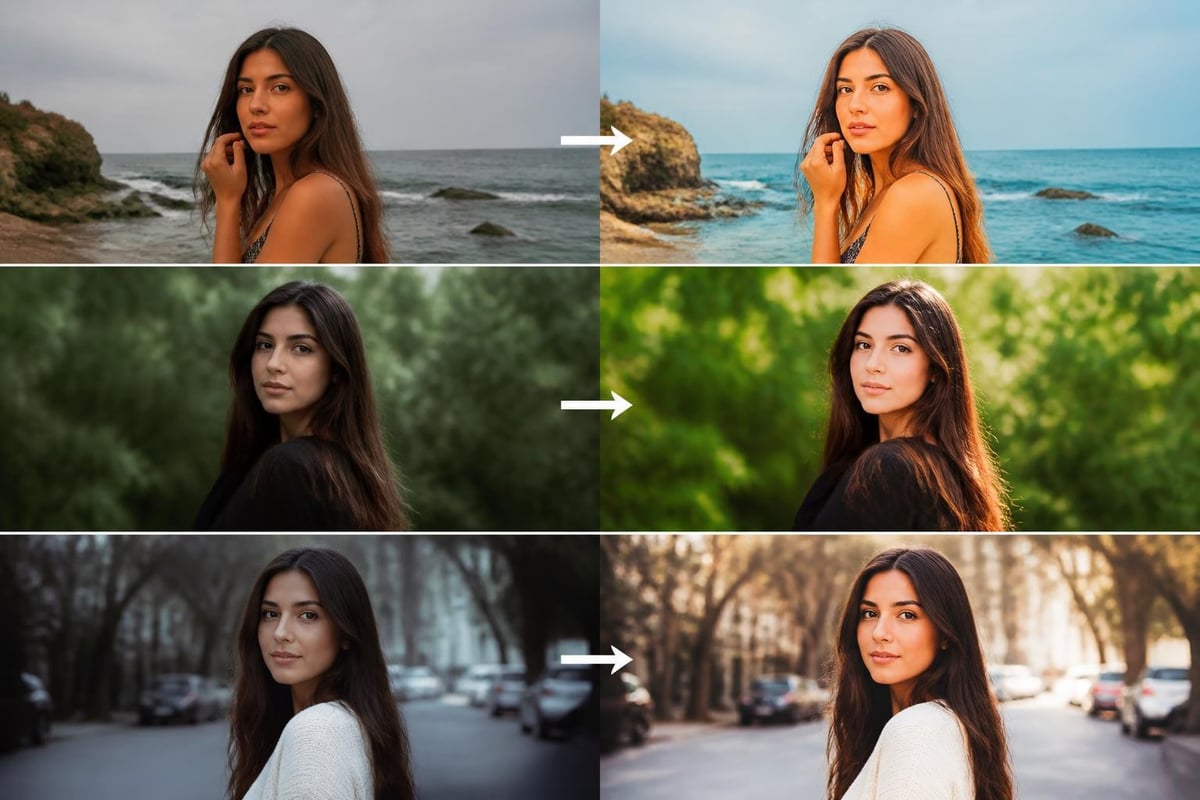
Consistent color grading across your feed creates a recognizable visual identity. This involves establishing a signature look through specific color temperature adjustments, tonal curves, and selective color modifications.
- Analyze your existing feed to identify color patterns
- Create custom presets that reflect your brand aesthetic
- Adjust white balance to establish mood and atmosphere
- Use split toning to add complementary color casts to highlights and shadows
- Apply subtle vignetting to draw focus to central subjects
Research has shown that photo attributes significantly impact viewer perception and engagement, making color choices more than just aesthetic decisions. Warmer tones typically generate more engagement in lifestyle and food photography, while cooler tones work better for architecture and minimalist content.
Advanced Retouching Methods
Professional retouching goes beyond basic adjustments. Techniques like frequency separation allow you to independently control texture and color, creating flawless results without the artificial appearance of excessive smoothing.
- Remove distracting elements with content-aware fill tools
- Apply local adjustments to enhance specific image areas
- Use dodge and burn techniques for dimensional lighting
- Correct skin tones while preserving natural texture
- Sharpen strategically to enhance details without artifacts
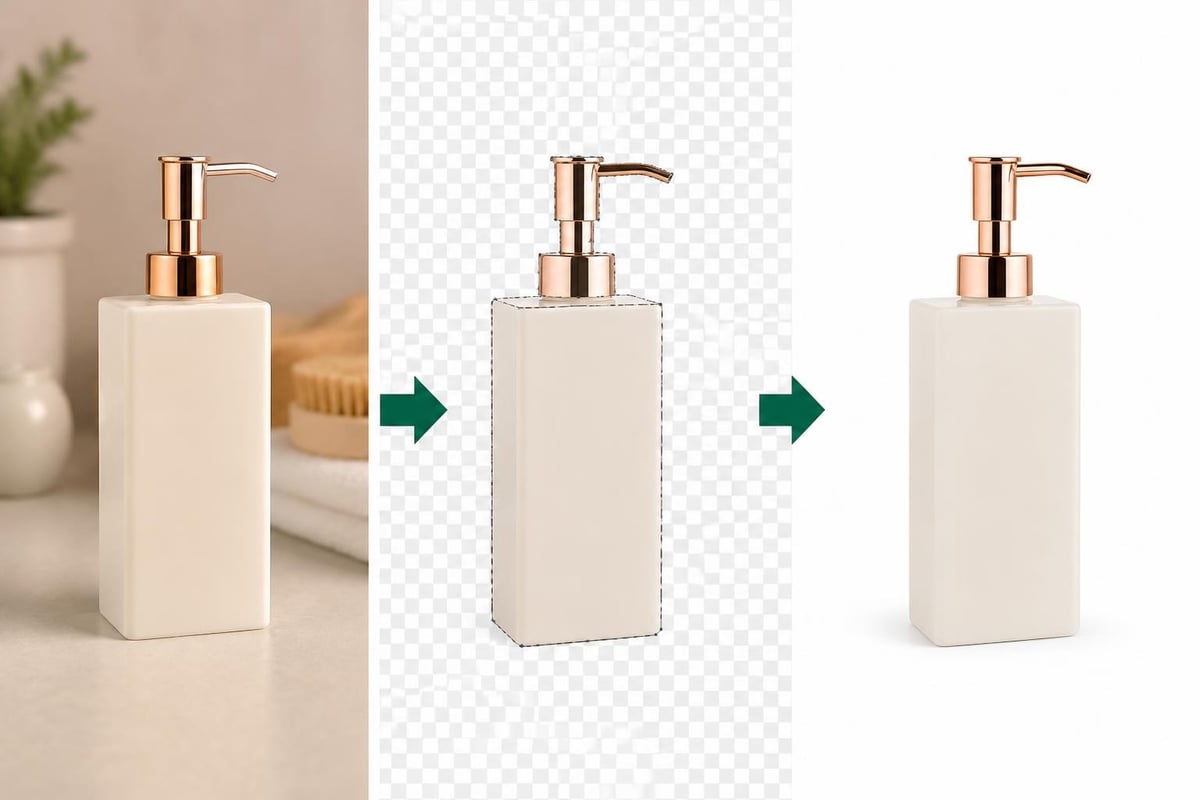
For businesses selling products online, professional editing becomes even more critical. Ecommerce photo editing services specialize in creating consistent, high-quality product images that drive conversions while maintaining brand consistency across Instagram feeds and online stores.
Top Photo Editor for Insta Options in 2026
The market offers numerous editing solutions, each with distinct advantages for Instagram content creation. Understanding the strengths of popular options helps you choose the right tool for your workflow.
Adobe Lightroom Mobile and Creative Cloud
Adobe's ecosystem remains the industry standard for professional photography. Lightroom Mobile combines powerful editing capabilities with cloud synchronization, allowing seamless workflow between devices. The subscription model provides access to regular updates and the complete Creative Cloud suite.
VSCO and Snapseed
VSCO continues to dominate among influencers and content creators who prioritize film-inspired aesthetics. Its preset library offers sophisticated color grading options, while the built-in community features provide inspiration and engagement opportunities.
Snapseed, Google's free mobile editor, provides surprisingly powerful tools including selective adjustments, healing brush, and perspective correction. Its intuitive interface makes advanced techniques accessible to beginners while offering sufficient control for experienced editors.
Pixelmator Pro and Affinity Photo
For desktop users seeking alternatives to Adobe's subscription model, Pixelmator Pro delivers professional-grade editing with a one-time purchase. Its machine learning-powered tools accelerate common tasks while maintaining creative control.
Affinity Photo offers nearly identical functionality to Photoshop at a fraction of the cost, making it ideal for serious hobbyists and small businesses managing Instagram content in-house.
Workflow Optimization for Instagram Content Creation
Efficiency separates professional content creators from amateurs. Developing a streamlined workflow allows you to maintain consistent output quality while managing time effectively.
Batch Processing and Preset Creation
Creating custom presets for different content categories dramatically reduces editing time. A well-organized preset library might include options for portraits, products, flat lays, and outdoor scenes, each with variations for different lighting conditions.
- Identify recurring image types in your content strategy
- Develop base adjustments for each category
- Save presets with descriptive, searchable names
- Test presets across various images to ensure versatility
- Refine and update presets based on performance metrics
Batch processing tools allow you to apply consistent adjustments across multiple images simultaneously. This approach works particularly well for product photography, where maintaining uniform appearance across catalog items ensures professional presentation.
Integration with Content Planning Tools
Modern Instagram strategies require coordination between editing software, scheduling platforms, and analytics tools. Many photo editors now offer direct integration with social media management systems, allowing you to edit, schedule, and analyze performance without switching applications.
While Instagram tests new features like unedited photo sharing apps, the core platform still rewards polished, professionally edited content with higher engagement rates. Balancing authenticity with professional presentation remains key to Instagram success.
Artificial Intelligence and Machine Learning in Photo Editing
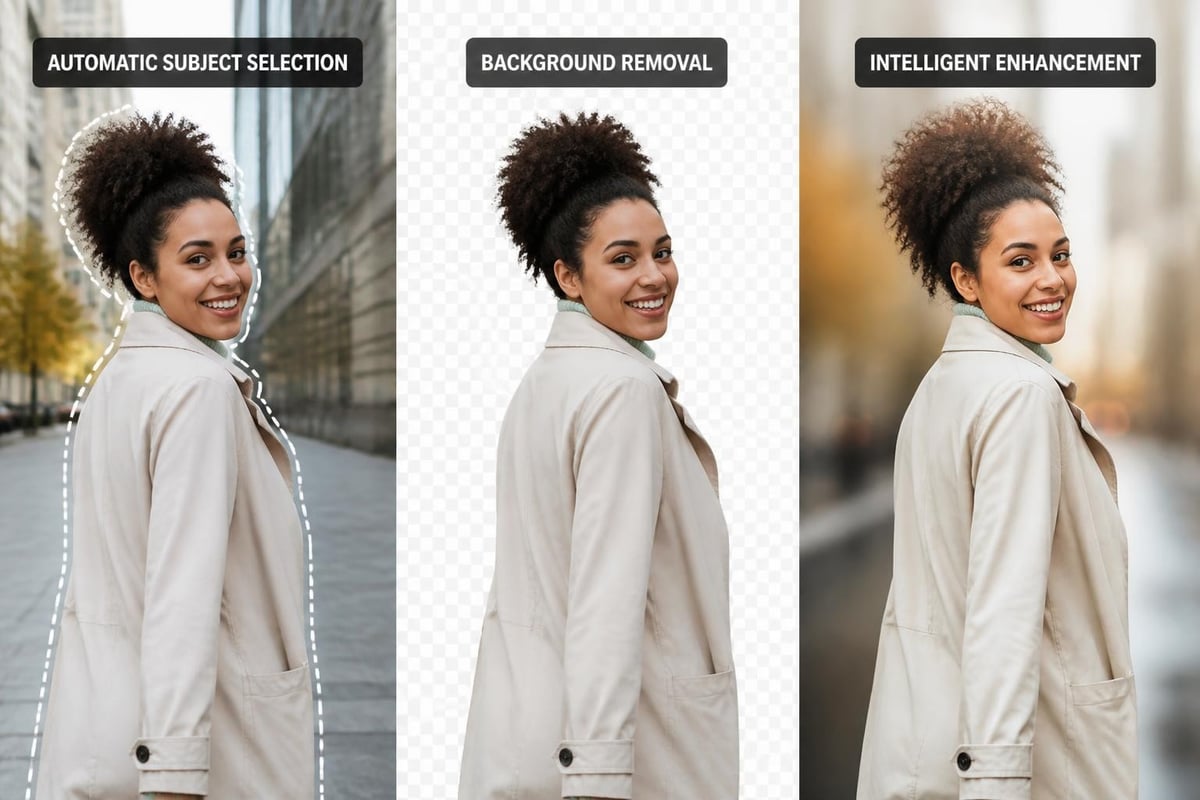
AI-powered tools have revolutionized how creators approach photo editing for Instagram. These technologies automate time-consuming tasks while maintaining or even improving quality compared to manual methods.
AI-Powered Enhancement Features
Modern photo editors incorporate machine learning for various tasks:
- Automatic subject selection for precise masking and background removal
- Sky replacement with realistic lighting adjustments
- Neural filters for style transfer and creative effects
- Intelligent sharpening that differentiates between detail and noise
- Content-aware fill for seamless object removal
Research into maximizing Instagram engagement while maintaining artistic style demonstrates that AI tools can help creators identify which images resonate most with their audience. These insights inform both shooting and editing decisions, creating a data-driven approach to visual content.
Balancing Automation with Creative Control
While AI tools increase efficiency, successful Instagram content requires human creative judgment. The most effective workflow combines AI automation for technical tasks with manual adjustments for artistic decisions.
Smart automation handles: exposure correction, noise reduction, lens correction, and basic color balance. Manual refinement focuses on: creative color grading, compositional adjustments, selective emphasis, and brand-specific styling.
Mobile Editing Apps for On-the-Go Content Creation
Smartphone cameras now rival professional equipment in many scenarios, making mobile editing apps increasingly sophisticated to match capture quality. A capable photo editor for Insta on your phone enables complete content creation workflows without desktop access.
Specialized Mobile Editing Solutions
Different apps excel at specific tasks, leading many professionals to use multiple applications in sequence rather than relying on a single solution.
| Application | Primary Strength | Best Use Case |
|---|---|---|
| Lightroom Mobile | Professional adjustments, RAW support | Comprehensive editing with cloud sync |
| VSCO | Film-inspired presets, community | Consistent aesthetic development |
| Snapseed | Advanced tools, completely free | Detailed retouching on mobile |
| TouchRetouch | Object removal | Cleaning up distracting elements |
| Facetune | Portrait retouching | People-focused content |
Natural Editing for Authentic Engagement
The trend toward authenticity on Instagram has created tension between polished editing and genuine presentation. Maintaining authenticity while pursuing algorithmic growth requires strategic editing choices that enhance rather than fabricate reality.
Natural Instagram photo editing techniques focus on subtle improvements that enhance existing qualities rather than dramatic transformations. This approach includes gentle skin retouching, environmental cleanup, and color correction that maintains realistic tones.
Professional Services vs DIY Editing
Deciding between in-house editing and professional services depends on several factors including volume, quality requirements, time constraints, and budget considerations.
When to Consider Professional Editing Services
High-volume content creation often justifies outsourcing editing work. Professional services process images faster and more consistently than individual creators managing multiple responsibilities. This becomes particularly valuable for businesses managing product catalogs, real estate portfolios, or fashion collections.
Specialized requirements like jewelry photography, which demands precise reflection management and gemstone enhancement, benefit significantly from expert retouching. Professional jewelry photo editing services handle complex lighting scenarios and material characteristics that challenge even experienced photographers.
Building In-House Editing Capabilities
Smaller operations or creators with specific artistic visions might prefer developing internal editing skills. This approach offers complete creative control and eliminates external dependencies, though it requires time investment in learning and practice.
Consider these factors when deciding:
- Volume: How many images require editing weekly?
- Consistency: Do you need uniform styling across large image sets?
- Specialization: Do your images require specific technical expertise?
- Timeline: How quickly must edited images reach Instagram?
- Budget: Is outsourcing more cost-effective than internal hours?
Emerging Trends in Instagram Photo Editing
The Instagram landscape continues evolving, with new editing trends emerging from creator communities, platform features, and broader visual culture shifts.
Grain and Texture Revival
Counter to the ultra-smooth aesthetic that dominated previous years, 2026 sees increased appreciation for film grain and texture. This trend connects to nostalgia for analog photography while providing visual interest that helps images stand out in crowded feeds.
Many creators intentionally add grain during editing, using it as both an aesthetic choice and a technique to unify disparate images within a cohesive feed. The texture creates a tangible quality that contrasts with the clinical perfection of over-processed images.
Minimalist Color Palettes
Simplified color schemes with limited palettes create sophisticated, gallery-quality feeds. This approach involves desaturating competing colors while preserving or enhancing one or two dominant hues, resulting in immediately recognizable visual branding.
Photographers interested in this aesthetic approach might appreciate platforms like Irys, which emphasizes high-quality photographic presentation without compression or aggressive filtering. While not specifically an editor, such platforms influence how creators approach image quality and presentation.
Cost-Effective Editing Solutions for Small Businesses
Budget constraints shouldn't prevent small businesses from creating professional Instagram content. Several affordable options deliver impressive results without enterprise-level investment.
Free and Low-Cost Software Options
Snapseed remains completely free while offering tools comparable to paid applications. GIMP, though designed for desktop, provides Photoshop-like capabilities at no cost, suitable for businesses willing to navigate its learning curve.
For Windows users specifically, Zoner Studio offers cost-effective editing and organization suitable for entry-level to intermediate photographers managing Instagram content alongside other business photography needs.
Maximizing Value from Editing Investments
Regardless of budget level, certain strategies maximize returns from editing software investments:
- Master one platform completely before exploring alternatives
- Create comprehensive preset libraries for recurring content types
- Develop standardized workflows that reduce decision fatigue
- Invest in education through tutorials and courses
- Track performance metrics to identify which editing approaches drive engagement
Video Integration and Dynamic Content Editing
Instagram's evolution toward video content requires editors who handle both still images and motion graphics. A complete photo editor for Insta strategy in 2026 includes capabilities for Reels, Stories, and standard video posts.
Unified Editing Approaches
Maintaining consistent visual branding across photos and videos requires coordinated color grading and stylistic choices. Many professional editors use the same LUTs (Look-Up Tables) for video color grading that they've developed for still photography, ensuring feed cohesion.
Tools like AdsRaw demonstrate how AI-powered platforms are transforming content creation by generating UGC-style video ads that maintain brand consistency while testing multiple creative approaches. While focused on advertising, these technologies indicate future directions for all Instagram content creation.
Technical Considerations for Professional Results
Beyond creative decisions, technical knowledge separates amateur editing from professional results. Understanding how Instagram processes images allows you to prepare files that survive compression with minimal quality loss.
Export Settings and Quality Preservation
Sharpening strategy significantly impacts final appearance after Instagram's compression. Apply output sharpening specifically calibrated for web display, typically more aggressive than print sharpening but carefully controlled to avoid artifacts.
Color space management ensures consistent appearance across devices. Always convert to sRGB before upload, regardless of your working color space, as Instagram doesn't preserve wide-gamut color profiles.
Metadata and Copyright Protection
Properly configured metadata protects your work and provides professional context. Include copyright information, creator credits, and relevant keywords in EXIF data, though be aware Instagram strips most metadata during upload.
For businesses managing extensive image libraries, consistent metadata practices enable efficient asset management and support intellectual property protection beyond Instagram's platform.
Mastering photo editing for Instagram requires combining technical knowledge, creative vision, and strategic planning to create content that engages audiences while representing your brand professionally. Whether you choose to develop in-house capabilities or leverage specialized expertise, the right approach transforms ordinary images into compelling visual stories. Photo Editing Company provides professional photo retouching services including AI-powered editing, color correction, background removal, and comprehensive social media optimization, helping businesses worldwide create Instagram content that drives engagement and supports their marketing objectives.