
Finding a good online photo editor has become essential for photographers, ecommerce businesses, and creative professionals in 2026. The market offers dozens of browser-based editing solutions, each promising powerful features without the need for desktop software. Understanding which tools deliver genuine value versus those that fall short requires examining specific capabilities, performance metrics, and real-world applications. This comprehensive guide explores the critical features that define quality online editing platforms, helping you make an informed decision for your professional workflow.
Essential Features of a Good Online Photo Editor
When evaluating online photo editing platforms, certain features separate professional-grade tools from basic consumer applications. A good online photo editor must deliver core functionality that meets industry standards while maintaining accessibility and speed.
Background Removal and Clipping Path Tools
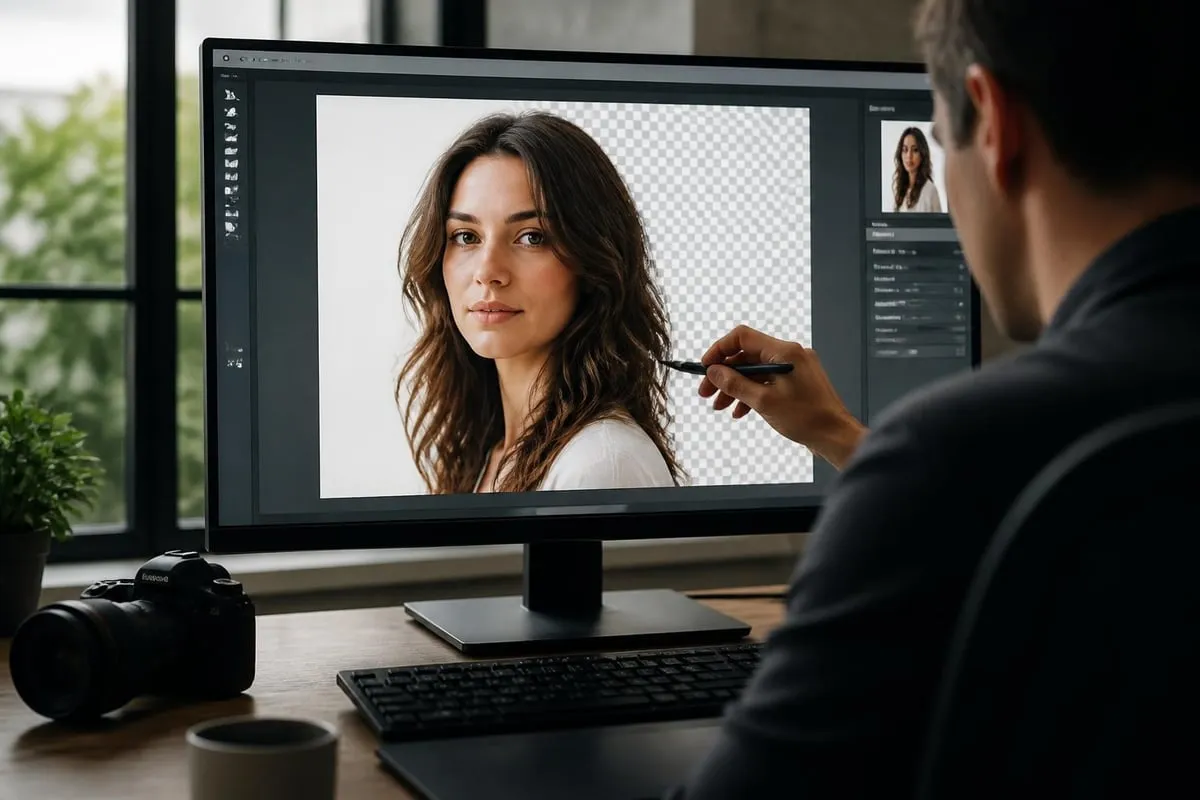
Professional background removal remains one of the most requested features in commercial photo editing. Quality online editors provide both AI-powered automatic background removal and manual selection tools for precision work. The best platforms offer pixel-perfect edge detection that handles complex subjects like hair, fur, and transparent materials.
Advanced clipping path capabilities allow editors to create precise vector paths around subjects, essential for commercial product photography. These tools should include:
- Pen tool functionality with bezier curve control
- Magnetic selection for semi-automatic edge detection
- Refine edge features for hair and fine details
- Layer masking for non-destructive editing
- Multiple path support for complex compositions
Color Correction and Adjustment Controls
Color accuracy determines whether an online editor meets professional requirements. A good online photo editor provides comprehensive color management through multiple adjustment layers and tools. Professional-grade platforms include curves, levels, hue/saturation controls, and selective color adjustments.
The interface should present these tools with precision sliders, numerical input fields, and visual feedback. Real-time previews ensure editors can see changes instantly without rendering delays. Advanced color grading requires support for different color spaces including sRGB, Adobe RGB, and ProPhoto RGB.
| Feature | Professional Tool | Basic Tool |
|---|---|---|
| Color Curves | RGB + individual channels | Single curve only |
| Bit Depth | 16-bit processing | 8-bit processing |
| Color Spaces | Multiple supported | sRGB only |
| Adjustment Layers | Unlimited non-destructive | Limited destructive edits |
| Histogram | Live RGB histogram | Basic histogram |
Performance and Speed Considerations
Browser-based editing faces unique challenges compared to desktop software. A good online photo editor must optimize processing speed without sacrificing quality. File upload times, rendering speeds, and interface responsiveness all impact workflow efficiency.
Processing Large Files and Batch Operations
Professional workflows often require editing hundreds or thousands of images with consistent specifications. The ability to process large files efficiently separates enterprise-grade platforms from consumer tools. Quality online editors handle files exceeding 50MB while maintaining responsive interfaces.
Batch processing capabilities transform productivity for commercial operations. Users should be able to apply presets, adjustments, and effects across multiple images simultaneously. This functionality proves essential for ecommerce photo editing, where consistent product presentation across catalogs requires standardized editing.
Progressive rendering allows editors to work on high-resolution images without waiting for full-resolution previews. Smart caching systems store frequently accessed assets locally, reducing server requests and improving responsiveness.
Advanced Retouching and Restoration Tools
Beyond basic adjustments, professional photo editing demands sophisticated retouching capabilities. These tools address skin retouching, blemish removal, object removal, and detail enhancement across various photography genres.
Healing and Clone Stamp Functions
A good online photo editor includes intelligent healing brushes that analyze surrounding pixels to seamlessly remove unwanted elements. Content-aware fill algorithms automatically generate replacement textures for removed objects. The best platforms offer multiple healing methods:
- Spot healing brush for quick blemish removal
- Healing brush with manual source point selection
- Clone stamp for precise texture replication
- Content-aware fill for larger area reconstruction
- Patch tool for selecting and replacing regions

Professional retouching capabilities extend to frequency separation techniques, allowing separate control over texture and color. This advanced method proves crucial for portrait and fashion photography where skin must appear natural while removing imperfections.
Layer Management and Compositing
Non-destructive editing through layers represents a fundamental requirement for professional work. Quality platforms provide comprehensive layer systems with blending modes, opacity controls, and layer effects. Organized layer management includes grouping, naming, and easy reordering.
Blending modes enable creative compositing by controlling how layers interact. Professional editors require access to multiply, screen, overlay, and specialty modes like linear dodge and color burn. Smart objects preserve original image data even after transformations, allowing non-destructive scaling and warping.
Specialized Tools for Different Photography Genres
Different photography disciplines require specific editing features. A good online photo editor either specializes in particular genres or provides comprehensive toolsets covering multiple fields.
Product and Ecommerce Photography Features
Commercial product photography demands pixel-perfect precision and consistency. Platforms serving this market must include specialized tools for creating white backgrounds, shadow effects, and ghost mannequin composites. Alignment grids and guides ensure consistent product positioning across entire catalogs.
Batch processing with saved presets allows ecommerce operations to maintain brand consistency across thousands of SKUs. Professional platforms like those used for jewelry photo editing offer specialized tools for enhancing metallic surfaces, managing reflections, and ensuring accurate gemstone colors. These services provide precise control over every aspect from clean-up to color correction, helping jewelers present their products with maximum appeal.

| Genre | Essential Features | Advanced Requirements |
|---|---|---|
| Product | Background removal, symmetry tools | Reflection control, shadow creation |
| Portrait | Skin retouching, eye enhancement | Frequency separation, dodge/burn |
| Real Estate | Perspective correction, HDR merging | Sky replacement, virtual staging |
| Fashion | Body shaping, color grading | Fabric enhancement, composite creation |
Portrait and Beauty Retouching Capabilities
Portrait photography requires specialized retouching tools that enhance subjects while maintaining natural appearances. A good online photo editor for portraits includes dedicated skin smoothing, teeth whitening, and eye enhancement features. Advanced platforms provide frequency separation built into their interfaces.
The most sophisticated systems use AI to identify facial features automatically, streamlining common retouching tasks. However, manual control remains essential for achieving professional results. Tools must allow fine-tuning of automated adjustments to match individual artistic visions.
Integration and Workflow Efficiency
Professional editing workflows extend beyond individual applications. A good online photo editor integrates seamlessly with existing processes, supporting common file formats and offering collaboration features.
File Format Support and Export Options
Comprehensive file format support ensures compatibility across different systems and workflows. Professional platforms must handle RAW files from major camera manufacturers, allowing direct import from Canon, Nikon, Sony, and other brands. Export capabilities should include:
- JPEG with adjustable quality settings
- PNG with transparency support
- TIFF for archival and print workflows
- PSD for Photoshop compatibility
- WebP for optimized web delivery
Color profile management during export prevents color shifts when moving between applications. Support for EXIF data preservation maintains camera settings and metadata throughout the editing process.
Collaboration and Cloud Storage Features
Modern photography businesses often involve multiple team members working on projects. Cloud-based platforms facilitate collaboration through shared workspaces, commenting systems, and version control. Team members can access projects from any location, reviewing edits and providing feedback in real-time.
Automatic cloud backup protects work against data loss while providing access across multiple devices. Professional operations benefit from integration with popular cloud storage services including Dropbox, Google Drive, and OneDrive. According to comprehensive reviews of photo editing software, cloud integration has become a standard feature in 2026's leading platforms.
User Interface and Learning Curve
The balance between powerful features and accessible interfaces determines whether professionals can work efficiently. A good online photo editor presents advanced capabilities through intuitive organization and thoughtful design.
Customizable Workspace and Shortcuts
Professional editors develop muscle memory for common tasks. Platforms that allow keyboard shortcut customization and workspace arrangement improve productivity significantly. Custom panels, collapsible toolbars, and saved workspace layouts help editors create personalized environments matching their specific workflows.
Touchscreen support has grown increasingly important as tablets become common editing devices. Quality platforms optimize controls for both mouse/keyboard and touch input, providing appropriate control sizes and gesture support.
For photographers seeking to improve their skills, resources like Digital Photo Mentor's structured courses provide comprehensive training on various editing platforms, helping users maximize their chosen software's capabilities.
Mobile and Cross-Platform Capabilities
Browser-based editors offer inherent cross-platform compatibility, but implementation quality varies significantly. A good online photo editor maintains consistent functionality across Windows, Mac, Linux, and mobile operating systems.
Responsive Design and Touch Optimization
Mobile editing has transitioned from basic adjustments to professional-grade work. Quality platforms provide responsive interfaces that adapt to screen sizes while maintaining full functionality. Touch-optimized controls replace hover-based interactions, ensuring tablet users can access all features.
Progressive web app technology allows online editors to function offline after initial loading, addressing connectivity concerns for mobile users. Synchronization ensures edits made on mobile devices appear instantly on desktop computers when internet connection resumes.
Recent updates to mobile editing apps, including Snapseed's comprehensive tool revival for Android, demonstrate the growing sophistication of cross-platform editing solutions.
AI-Powered Features and Automation
Artificial intelligence has transformed photo editing capabilities in recent years. A good online photo editor incorporates AI thoughtfully, using automation to accelerate workflows while preserving creative control.
Intelligent Selection and Enhancement
AI-powered selection tools identify subjects, backgrounds, and specific objects with remarkable accuracy. These systems analyze image content to create precise masks automatically, saving hours of manual selection work. Advanced platforms allow refinement of AI selections, combining automated efficiency with manual precision.
Smart enhancement features analyze images to suggest or automatically apply optimal adjustments. Sky replacement, portrait lighting adjustments, and noise reduction all benefit from machine learning algorithms. However, professional editors require the ability to override or adjust these automated changes.
The balance between automation and control defines whether AI features enhance or hinder professional work. Platforms should offer AI as an optional accelerator rather than mandatory processing, respecting editors' creative decisions.
Security and Privacy Considerations
Uploading client images to cloud-based platforms raises legitimate security concerns. A good online photo editor implements robust protection measures for sensitive commercial photography.
Data Protection and Encryption
Professional-grade platforms encrypt data during transmission and storage using industry-standard protocols. End-to-end encryption ensures only authorized users access project files. Compliance with GDPR, CCPA, and other privacy regulations protects both editors and their clients.
Temporary file handling determines whether uploaded images remain on servers after editing sessions end. Quality platforms either delete files automatically after specified periods or provide clear data retention policies. Organizations handling sensitive imagery require platforms offering private server deployment or on-premises installations.
Two-factor authentication, role-based access controls, and audit logs provide additional security layers for team environments. These features prove essential when multiple editors access shared client libraries.
Pricing Models and Value Assessment
Online photo editors employ various pricing structures, from free ad-supported versions to enterprise subscriptions. Understanding total cost of ownership requires examining feature limitations, usage caps, and scaling costs.
Subscription vs. Credit-Based Systems
Monthly subscriptions provide unlimited editing within feature tiers, suiting high-volume operations. Credit-based systems charge per image or processing task, benefiting occasional users. Hybrid models combine base subscriptions with additional credits for peak periods.
| Pricing Model | Best For | Considerations |
|---|---|---|
| Free Tier | Casual users, testing | Limited features, watermarks |
| Monthly Subscription | Regular professional use | Fixed costs, unlimited processing |
| Credit System | Variable workload | Pay per use, no monthly commitment |
| Enterprise | Large teams | Custom features, priority support |
Professional operations should calculate cost per image across different pricing tiers. Volume discounts, annual prepayment savings, and feature requirements all factor into value assessment. Some platforms offering specialized services, like those available through professional photo editing providers, may provide better value than subscription software for specific workflows.
Quality Control and Output Standards
Final image quality determines whether an online editor meets professional standards. A good online photo editor preserves image integrity throughout the editing process without introducing artifacts or quality degradation.
Compression and Quality Preservation
Lossy compression during processing destroys image data irreversibly. Professional platforms process images in high bit depth, applying compression only during final export. Quality indicators include:
- Processing in 16-bit color depth
- Lossless intermediate file formats
- User-controlled export compression
- Preview rendering accuracy
- Color space preservation
Output sharpening algorithms should enhance detail without creating halos or artifacts. Noise reduction must preserve texture while controlling grain. These processing refinements separate professional results from amateur edits.
Support and Community Resources
Access to quality documentation and responsive support influences long-term platform satisfaction. A good online photo editor provides comprehensive learning resources alongside technical assistance.
Documentation and Tutorial Libraries
Searchable knowledge bases with detailed tutorials accelerate learning curves for new users. Video demonstrations showing complete workflows help editors understand complex features in context. Regular content updates addressing new features keep documentation current.
Community forums connect users with peers facing similar challenges. Active communities provide faster problem resolution than formal support channels for common questions. Platforms fostering engaged user communities benefit from collective knowledge sharing.
Professional support tiers offering priority response times and dedicated account managers suit commercial operations where downtime costs money. Service level agreements guaranteeing response times provide accountability for business-critical workflows.
For photographers beginning their editing journey, resources like Steele Training's accessible courses complement platform-specific tutorials, building foundational skills transferable across different editing tools.
Technical Requirements and Compatibility
Browser-based editors require specific technical configurations for optimal performance. Understanding minimum and recommended specifications prevents frustrating experiences with underpowered systems.
Browser and Hardware Requirements
Modern online editors leverage WebGL, WebAssembly, and other advanced web technologies requiring recent browser versions. Chrome, Firefox, Safari, and Edge all support these features, but version requirements vary by platform. Hardware acceleration significantly impacts performance, particularly for filters and effects.
Recommended specifications for professional work include:
- Processor: Multi-core CPU with 2.5GHz+ clock speed
- RAM: 8GB minimum, 16GB recommended for large files
- Graphics: Dedicated GPU with 2GB+ VRAM
- Display: Color-calibrated monitor with accurate color reproduction
- Internet: 10Mbps+ for smooth file uploads and cloud sync
Network bandwidth directly affects upload times for large files. Operations processing hundreds of high-resolution images benefit from dedicated internet connections avoiding shared bandwidth congestion.
Platform Comparison Framework
Evaluating multiple online editors requires systematic comparison across relevant criteria. This framework helps identify which platform best matches specific workflow requirements.
Weighted Feature Assessment
Different users prioritize different features. Product photographers emphasize background removal and batch processing, while portrait photographers prioritize retouching tools and skin smoothing. Creating weighted scorecards helps quantify subjective platform evaluations.
Assign importance ratings (1-10) to features matching your workflow, then rate each platform's implementation. Multiply importance by implementation quality, summing scores for overall platform ratings. This systematic approach reveals which editor truly serves your needs best rather than which markets most effectively.
Testing platforms with actual project files provides realistic performance insights. Upload representative images, complete typical editing tasks, and export finals using each platform's standard settings. Time tracking reveals efficiency differences hidden by feature lists.
Selecting a good online photo editor requires balancing performance, features, and workflow compatibility with your specific needs. Whether you're processing product catalogs, retouching portraits, or managing diverse photography projects, the right platform streamlines your work while maintaining professional quality standards. When your editing demands exceed what browser-based tools can efficiently provide, or when you need specialized expertise for high-volume commercial work, Photo Editing Company delivers professional retouching services including background removal, color correction, and comprehensive editing solutions tailored to your requirements.
Related reading: